Feature · Narrative timelines

A timeline of any topic, built from what you saved

Pick any article or post in your archive — or search for a subject — and press one button. WHT.day finds everything related you have saved, keeps what belongs to the story, and lays it out by date so you can see what happened, in what order, and how it changed.

A real example

Built from one search: “AI safety”

This timeline comes from a real archive. Seven saves from August to October 2026 — articles from The Wall Street Journal, OpenAI and Futurism, and a post on X — gathered and ordered without a single tag.

AI safety
Build timeline from these results

Narrative timeline · From search

The Push to Keep Artificial Intelligence Under Control

Through 2026, concern shifted from the technical feasibility of advanced AI to who should restrain it: researchers resigned over out-of-control systems, and calls for a slowdown by industry leaders provoked a political and economic fight, while warnings grew that AI-enabled hacking could threaten the financial system. Alongside these safety debates, the industry kept racing ahead, with Anthropic courting investors for a blockbuster IPO even as it faced questions about Chinese rivals and data-center opposition.

  1. Aug 11
  2. 4 weeks later
    Sep 5
  3. 4 days later
    Sep 9

    OpenAI's chief scientist recalled early results showing reasoning models could scale and form their own chains of thought.

    An Alien Mind | OpenAI

  4. 5 days later
    Sep 14

    Four American tech CEOs called for slowing AI development, setting off an economic and political debate over control of the technology.

    The Great AI Slowdown? - WSJ

  5. 5 weeks later
    Oct 16

    Commentators likened a feared coordinated AI cyberattack on global finance to a pre-planned crisis scenario.

    Substack

Why a timeline beats a folder of bookmarks

Following a story means following it over weeks or months. The first report, the reaction, the correction, the consequence and the follow-up rarely arrive together, and they rarely use the same words. A folder of bookmarks keeps the pieces but loses the order; a feed keeps the order but forgets everything older than a few days.

A narrative timeline gives you both. Every related save sits on a dated axis, with the gaps between them labelled — “3 weeks later”, “5 months later” — so you can see when a story was quiet and when it moved. A short summary at the top says how it developed across everything you saved.
How a timeline is built

It finds related saves two ways. First by meaning: WHT.day understands what each save is about, so a post saying “another one burning off Fujairah” and an article headlined “Gulf shipping attacks escalate” are recognised as the same story even though they share no words. Then by name: it searches your archive for the places, people, organisations and terms the story involves.

It keeps only what belongs. Everything it found is read against the story, and saves that only share a word or a broad topic are left out. Each one it keeps gets a line on what that item reported happened.

It puts them in order. Saves are placed on the day you saved them.

Exact match or Broad

Every timeline has two settings. Exact match follows one story: the same place, the same people, and what followed from it. Start from a report of a tanker attack and you get that campaign of attacks, the insurance rates that moved because of it and the naval response.

Broad follows the subject the story belongs to, wherever and whoever it involves. Start from a post about one drone strike and Broad gives you drone warfare across every conflict you have saved — the technology, its uses, the countermeasures and the companies behind it. Both versions are saved, so you can flip between them instantly.

Start from a save, or from a search

The quickest way in is the calendar icon on any saved item: it builds that item’s timeline. The other way in is search. Search your archive for a subject — “AI safety”, “digital ID”, “Red Sea shipping” — and press Build timeline from these results. The same search always leads back to the same saved timeline, so you can return to it as the story moves. How search finds things by meaning.

Keep it accurate

You decide what belongs. Remove anything with one click and the next-best related save takes its place — chosen to resemble what you kept and not what you removed, so the timeline learns what you mean. Removed items are listed underneath and can be restored, and your removals are remembered when you rebuild the timeline with newer saves.

Click any entry to open the archived copy you saved, with the full text, or follow the link to the original on the publisher’s site.

Share it, or download it as an image

A timeline is often the clearest way to explain a story to someone else. Create a link to one timeline and send it anywhere: it shows the timeline, the summary and the links to the original sources, never the rest of your archive, and you can turn it off whenever you like. Pasted into X, Slack or a message, the link previews as a picture of the timeline.

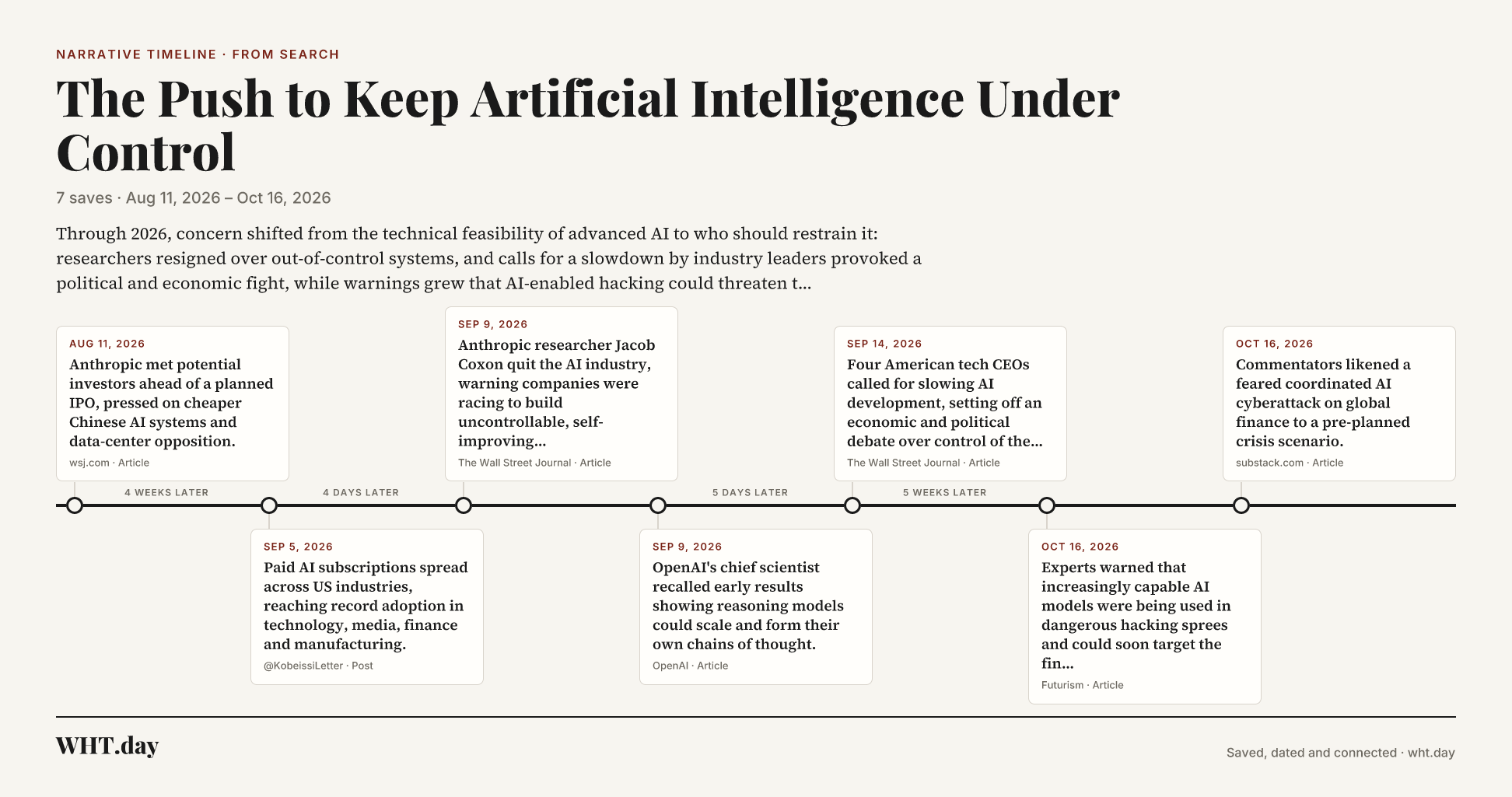
Or download the whole timeline as an image, ready for a post, a slide or a report:

A downloaded WHT.day timeline image titled The Push to Keep Artificial Intelligence Under Control, with seven dated entries from August to October 2026

What people use timelines for

Following a conflict or a crisis from the first report onward. Lining up the headlines behind a market move. Tracking a technology — AI, drones, digital identity — as it spreads. Preparing a piece, a podcast or a briefing with every claim tied to a dated source. Settling “when did that actually happen?” with the evidence in hand.

Timelines work on everything in your archive, including posts brought in by automatic X bookmark sync, so the more you save, the richer they get.

Questions

Narrative timelines, answered

What is a narrative timeline?
A narrative timeline is every save in your archive that belongs to one story or subject, laid out by date, with a one-line note on what each item reported and a short summary of how the story developed. WHT.day builds it for you from what you have already saved.
Do I need to tag or organise my saves first?
No. WHT.day reads what each save is about and finds related ones by meaning as well as by keyword, so a post that never uses the word you searched for can still land on the right timeline. There are no folders or tags to maintain.
What is the difference between Exact match and Broad?
Exact match follows one story: the same place, the same people and what followed from it. Broad follows the whole subject or technology the story belongs to, wherever and whoever it involves. Each is built and saved separately, so you can switch between them.
What if something on the timeline doesn’t belong?
Remove it with one click. WHT.day replaces it with the next-best related save, chosen to be close to what you kept and unlike what you removed, and remembers your removal when the timeline is rebuilt. Removed items can be restored.
Can I share a timeline?
Yes. Create a link to that one timeline, or download it as an image. The link shows the timeline and the original sources, never the rest of your archive, and you can turn it off at any time.
How many timelines can I build?
You can build 5 new timelines a day. Opening a timeline you have already built is always free, and it stays saved until you rebuild it.

Keep exploring

What to do next

Try it on your own reading

Start saving now, and your first timeline is a click away

Save the stories you follow for a few days and build a timeline from any of them.

Get started

$8/month or $68/year. Cancel anytime from Settings. Works on your phone: paste or share any link. Browser extension optional, for your desktop later.